Starting an online store looks simple from the outside: choose a product, build a website, and wait for orders. In practice, the small decisions make the difference. A product can sell well but still lose money because shipping is expensive. A beautiful store can struggle because checkout feels confusing. A strong idea can fail because the supplier is unreliable or the owner never tested whether people actually want the item.
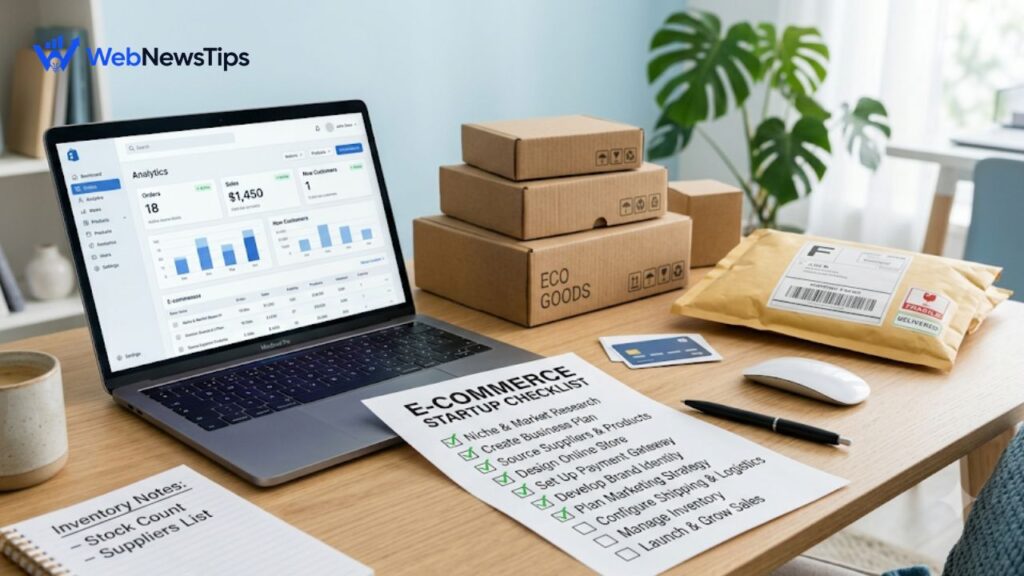
This e commerce business checklist helps beginners avoid those gaps. It covers product choice, sourcing, platform selection, payment gateways, shipping, product pages, marketing, and tracking. You do not need perfection on day one, but the important pieces must work together.
1. Define the Business Model Before Building the Store
Before comparing themes or logo ideas, decide how the business will operate. Handmade, print-on-demand, private-label, and dropshipping stores all have different costs and levels of inventory risk, delivery control, and quality control.
- Choose one clear product category or customer problem instead of launching a random general store.
- Decide whether you will hold inventory, use a supplier, manufacture products, or use print-on-demand.
- Write down who the ideal customer is, what they care about, and why they would choose your offer.
- Estimate how much money you can realistically invest in stock, samples, packaging, website tools, and marketing.
If you are still choosing a broader business model, read the WebNewsTips guide on how to start an online business before committing money to a store.
2. Validate Product Demand and Unit Economics
Do not treat product research as a search for something that looks trendy. Validation means finding evidence that people buy the type of product, understanding who already sells it, and checking whether the numbers can leave room for profit. Look at marketplace reviews, search results, social comments, forums, competitor pricing, and recurring complaints. The goal is not to copy another seller. It is to understand demand and find a clearer angle.
Calculate unit economics before placing a large order. From the selling price, subtract product cost, packaging, freight, payment processing, platform costs, shipping, returns allowance, and advertising. If the margin is already thin on paper, real-world problems can erase it quickly.
- Order samples before committing to bulk inventory.
- Test packaging, product quality, sizing, instructions, and breakage risk.
- Ask whether the product can survive discounting or paid advertising without destroying margin.
- Keep a buffer for refunds, replacements, damaged stock, and unexpected shipping charges.
3. Build a Reliable Product Sourcing Plan
Sourcing is more than finding the lowest price. A cheap supplier who misses deadlines or changes materials can cost more than a slightly higher-priced partner who is consistent. Compare several suppliers and ask the same questions so you can judge them fairly. Request samples, confirm lead times, minimum order quantities, packaging options, quality-control steps, and what happens when items arrive defective.
For imported products, include freight, customs, duties, inspection, and possible delays. For local sourcing, check whether stock can scale. For dropshipping or print-on-demand, place a test order yourself so you see the packaging, tracking, and delivery experience firsthand.
- Keep supplier contact details, quotations, sample notes, and lead times in one document.
- Have a backup supplier for your most important products where possible.
- Do not advertise delivery promises that your supplier cannot consistently meet.
- Confirm any branding, packaging, or customization in writing before production.
4. Choose the Right E-commerce Platform
The best platform is the one that fits your current business without creating unnecessary technical work. Hosted platforms can be easier for beginners because hosting, updates, and much of the store setup are managed in one place. WordPress with WooCommerce offers more control but normally requires more responsibility for hosting, security, plugins, and maintenance. Other hosted store builders can also work well for smaller catalogs.
Compare platforms using the features you actually need. Check total cost, transaction fees, payment gateways in your country, shipping integrations, inventory tools, mobile performance, SEO controls, reporting, and data export. Because pricing and supported services change, confirm current details on the platform’s official website before paying.
| Platform Type | Best For | Main Strength | Watch For |
| Hosted store platform | Beginners and growing brands | Fast setup and managed hosting | Monthly plan, app and transaction costs |
| WooCommerce / WordPress | Businesses wanting more control | Flexible ownership and customization | Hosting, maintenance, plugins and security |
| Marketplace-first selling | Testing demand quickly | Existing shopper traffic | Fees, competition and less brand control |
| Simple site builder store | Small catalogs and creators | Easy design and basic selling tools | May be limiting for complex operations |
5. Set Up Branding, Domain, and Essential Store Pages
A trustworthy store should feel complete even when the brand is new. Use an easy-to-spell name and a matching domain where possible. You do not need expensive branding, but the logo, fonts, photos, colors, and tone should feel consistent.
- Create Home, Shop, About, Contact, FAQ, Shipping, Returns/Refunds, Privacy, and Terms pages.
- Use a business email address instead of relying only on a personal inbox.
- Show realistic delivery expectations and return conditions before checkout.
- Check your legal, tax, privacy, product-labeling, and consumer-protection obligations for the countries where you operate and sell.
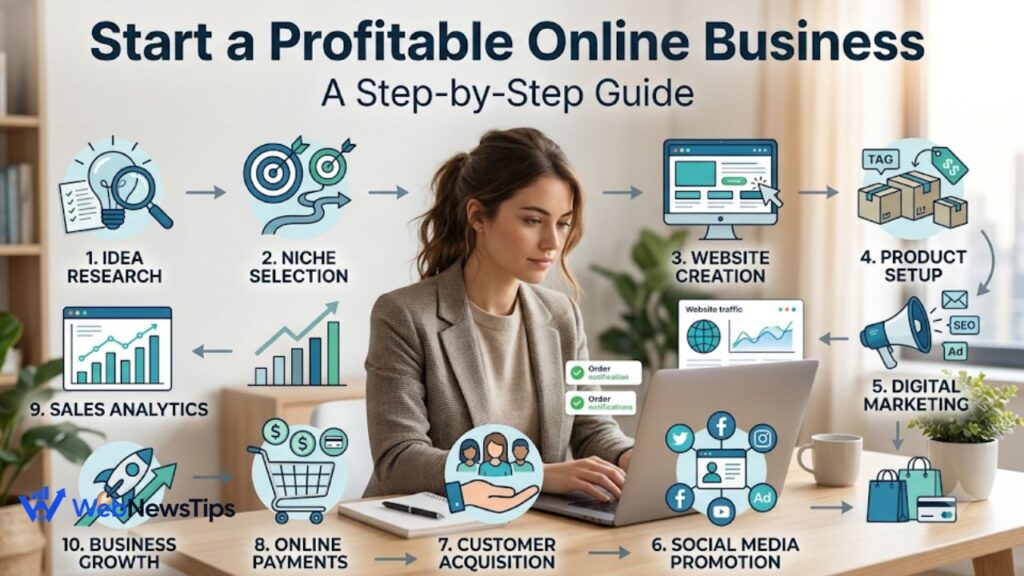
For a broader launch sequence beyond the store itself, use the step-by-step profitable online business guide as a companion checklist.
6. Configure Payment Gateways and Test Checkout
Payment is where interest turns into revenue, so checkout deserves serious testing. Choose gateways that are trusted by your target customers and available in your business location. Depending on the market, buyers may expect cards, wallets, bank-based methods, cash on delivery, or local payment options. Do not add every method simply because it exists; add the methods your customers are likely to use and that you can manage safely.
Review processing fees, payout timing, refunds, chargebacks, currencies, fraud controls, and account requirements. Complete a real test transaction on both phone and desktop, and check confirmations, taxes, discounts, shipping charges, inventory updates, and refunds.
7. Plan Shipping, Fulfillment, and Returns
Shipping can make a profitable-looking product unprofitable. Measure packed weight and dimensions, not just the product itself. Compare carriers or fulfillment partners for cost, tracking, delivery speed, service areas, insurance, and handling of lost parcels. Then decide whether you will charge a flat rate, calculate live rates, offer free shipping above a threshold, or include part of the shipping cost in the product price.
Write the shipping policy in plain language. Explain processing time, delivery windows, tracking, international limits, and what happens with delayed or lost parcels. Build the return process before your first return arrives so decisions stay consistent.
- Test-pack the product and calculate the real shipping cost to several common destinations.
- Decide who pays return shipping and under what conditions.
- Keep packaging protective but practical; oversized packaging can raise shipping costs.
- Create a simple procedure for damaged, missing, incorrect, and returned orders.
8. Create Product Pages That Answer Buying Questions
A product page should do more than describe the item. It should remove doubt. Use clear photos, useful close-ups, accurate dimensions, materials, compatibility details, care instructions, delivery information, and honest limitations. Write descriptions around what the customer needs to know before buying, not empty phrases such as ‘premium quality’ without proof.
Use descriptive titles, readable URLs, helpful headings, and natural keywords. Reviews, FAQs, size charts, comparisons, and short videos can reduce uncertainty. Avoid copying manufacturer descriptions because your store needs useful original content and its own voice.
Before publishing important store and category pages, you can review headlines with the free SEO Title Checker and draft search snippets with the WebNewsTips Meta Description Generator.
9. Build a Simple Marketing Blueprint Before Launch
Do not wait until the store is live to ask where customers will come from. Pick one or two acquisition channels you can manage consistently. Search-focused content can work well for products people actively research. Short-form social content can help visual or demonstrable products. Email helps you follow up with visitors and past customers. Paid ads can speed up testing, but they should not be the only reason the business works.
Create a small launch plan with strong product or category pages, supporting content, a welcome email, basic social proof, and a clear first-buyer offer. If you use discounts, make sure the margin can support them.
The WebNewsTips Digital Marketing guides can help you choose practical traffic channels instead of trying every platform at once.
10. Install Analytics and Track the Full Customer Journey
Once traffic begins, you need to know what people actually do. Track where visitors come from, which product pages they view, which items they add to cart, where checkout abandonment happens, and which channels generate completed orders. Revenue matters, but so do conversion rate, average order value, repeat purchase rate, refund rate, and customer acquisition cost.
If analytics is new to you, the Google Analytics 4 guide for beginners explains events, sessions, and acquisition reporting in simple terms.
Use data to improve one bottleneck at a time. Low add-to-cart rates can point to price, trust, photography, or product fit. Poor checkout completion can point to shipping charges, payment options, technical errors, or friction.
11. Run a Full Pre-Launch Test
Before announcing the store, behave like a first-time customer. Browse on another device, add and remove items, apply a coupon, calculate shipping, complete payment, read confirmation emails, and test a refund. Ask another person to do the same without your help; fresh eyes often find confusing steps you no longer notice.
[ ] Product pricing and margins have been calculated.
[ ] Supplier samples and quality have been checked.
[ ] Inventory or fulfillment process is ready.
[ ] Domain, contact details, and business email work.
[ ] Payment methods have been tested with a real transaction.
[ ] Shipping rates and delivery promises are realistic.
[ ] Return, refund, privacy, and terms pages are published.
[ ] Product pages work properly on mobile.
[ ] Analytics and order tracking are active.
[ ] Customer support process and response expectations are defined.
Frequently Asked Questions
What should be the first item on an e commerce business checklist?
Start with the customer, product, and business model. Before choosing a platform, confirm what you want to sell, who is likely to buy it, how the product will be sourced or fulfilled, and whether the expected price can leave enough margin after all major costs.
How much inventory should a new e-commerce business buy?
There is no universal quantity. Beginners should usually avoid buying more than they can justify with research, samples, test sales, or proven demand. Small initial orders reduce risk and give you a chance to improve the product before committing more cash.
Which payment gateway is best for an online store?
The best option depends on your country, customer location, currencies, platform, fees, payout timing, and preferred payment methods. Compare the providers supported by your store platform and verify current eligibility and pricing directly with each provider.
Should a new store offer free shipping?
Free shipping can improve the buying experience, but the cost still has to be paid by the business. Test whether you can include shipping in the product price, set a minimum order threshold, or use a flat rate without hurting your margin.
Final Thoughts
A successful store is rarely built from one clever product or campaign. It comes from small systems working together: useful products, reliable sourcing, sensible margins, easy payments, realistic shipping, clear policies, consistent marketing, and accurate tracking.
Use this e commerce business checklist as a working document rather than a one-time reading exercise. Complete the essentials, launch a manageable version, collect real customer data, and improve the weak points. That approach is less exciting than chasing shortcuts, but it gives a new e-commerce business a much stronger chance of becoming stable and profitable.