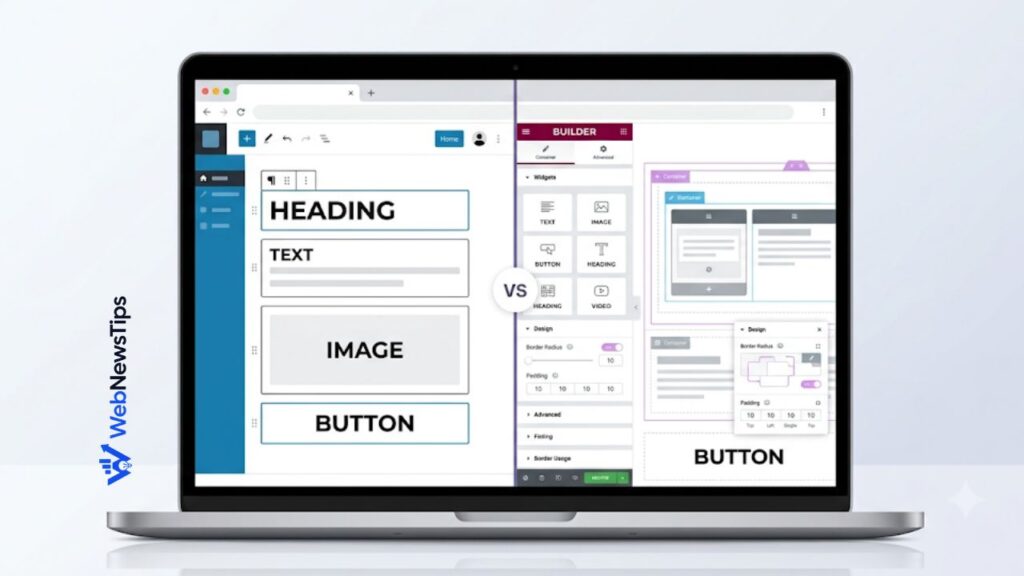
Choosing between WordPress Gutenberg and Elementor can feel confusing because both tools let you build pages visually, but they solve the problem in very different ways. Gutenberg, commonly called the WordPress block editor, is built into WordPress. Elementor is a separate drag-and-drop page builder plugin with a larger design toolkit and a more visual editing experience.
The better choice depends on your project, design needs, performance priorities, and budget. This WordPress Gutenberg vs Elementor comparison explains the practical differences so you can select the right builder without rebuilding your website later.
What Is WordPress Gutenberg?
Gutenberg is the native block-based editing system included with WordPress. Instead of writing all content inside one traditional editor, you build a page from individual blocks such as headings, paragraphs, images, buttons, columns, galleries, videos, quotes, and lists. Each block has its own settings and can be moved, duplicated, styled, or reused.
With a modern block theme, Gutenberg also works through the Site Editor, where you can customize headers, footers, templates, navigation, archive layouts, and global styles. Combined with patterns and a capable theme, it can support complete website design rather than only blog-post editing.
If you are still learning the WordPress dashboard, start with this WordPress beginner guide before deciding which editing workflow suits you.
What Is Elementor?
Elementor is a visual page builder plugin for WordPress. It provides a live front-end canvas where you can drag widgets into containers, control spacing, adjust typography, change backgrounds, create responsive layouts, and preview the result while you work. Its free version includes the core editor and common widgets, while paid plans add advanced design, marketing, dynamic-content, form, popup, and theme-building features.
Elementor is popular with freelancers, agencies, and marketers because it makes complex layouts easier to create without code. Templates and reusable elements can also speed up landing pages, portfolios, and service pages.
WordPress Gutenberg vs Elementor: Quick Comparison
| Feature | Gutenberg | Elementor |
| Type | Native WordPress block editor | Third-party visual builder plugin |
| Cost | Included with WordPress | Free core version; advanced features are paid |
| Ease for basic content | Simple and efficient | Easy, but offers more controls |
| Design freedom | Good with block themes and patterns | Very high visual control |
| Performance potential | Usually lighter by default | Can be fast, but requires careful optimization |
| Theme building | Available with block themes and Site Editor | Advanced Theme Builder features in paid plans |
| Maintenance | Fewer dependencies | Depends on plugin, add-ons, and licensing |
| Best suited to | Blogs, content sites, lean business sites | Landing pages, visual brands, client sites, complex layouts |
1. Ease of Use and Learning Curve
Gutenberg feels natural for writing articles and building straightforward pages. You add a block, enter content, adjust a few settings, and continue. The interface stays relatively close to the normal WordPress publishing workflow, which makes it efficient for bloggers, editors, and teams that mainly publish content.
However, Gutenberg can feel less intuitive when you begin creating advanced multi-column layouts, overlapping sections, or highly customized responsive designs. Some controls depend on the active theme, and settings may be distributed between the block toolbar, sidebar, global styles, and template editor.
Elementor is more visual because you see the page while dragging elements into position. This suits users who think in sections, spacing, alignment, and visual hierarchy. The trade-off is a larger collection of panels, widgets, responsive controls, and settings to learn.
2. Design Freedom and Customization
Elementor is stronger when detailed design control is the priority. It gives you granular control over margins, padding, widths, backgrounds, effects, breakpoints, positioning, and individual widget styles. You can build distinctive landing pages without depending heavily on your theme. Paid features also make it possible to visually design theme parts, forms, popups, and dynamic templates.
Gutenberg has improved significantly. Block themes, global styles, template parts, patterns, and the Query Loop block can produce modern websites. It may provide enough flexibility for blogs, magazines, documentation, and small business sites, although pixel-level control can still require CSS or additional blocks.
3. Website Speed and Performance
Gutenberg normally has an advantage in performance because it is part of WordPress and can generate relatively lean page structures. A simple page created with core blocks usually needs fewer additional scripts and styles than a complex page-builder layout. This does not automatically guarantee a fast website, because hosting, images, fonts, plugins, tracking scripts, and the theme still matter.
Elementor can also perform well with modern containers, optimized assets, caching, compressed images, limited animations, and a lightweight theme. Slowdowns are more likely when pages contain deeply nested layouts, large videos, several add-on packs, or excessive effects.
Whichever builder you choose, follow a complete WordPress speed optimization process instead of judging performance from the builder name alone.
4. SEO Capabilities
Both Gutenberg and Elementor can support SEO-friendly websites. Search rankings do not depend on choosing one specific builder. What matters more is useful content, correct heading structure, mobile usability, fast loading, descriptive image alt text, clean URLs, crawlable navigation, and sensible internal links.
Gutenberg makes it easy to keep content structure clean because headings, paragraphs, lists, images, and buttons are separate blocks. Elementor also allows proper HTML tags and responsive settings, but users should pay attention to heading levels and avoid using decorative widgets where semantic content would be better.
For stronger site structure, connect related articles naturally by following a practical internal linking strategy. The builder is only the editing tool; your content and technical decisions create the SEO result.
5. Theme Compatibility and Full-Site Editing
Gutenberg works with nearly every current WordPress theme for posts and pages, but full-site editing requires a block theme. With the right block theme, you can edit templates and global styles without installing a traditional page builder. This creates a more native WordPress setup with fewer moving parts.
Elementor works with many themes, but a lightweight theme designed for page builders usually provides the cleanest experience. Elementor can take control of individual pages, and paid theme-building features can replace standard headers, footers, post templates, and archive layouts. Compatibility should still be tested, especially when the theme already includes its own builder or unusual layout system.
6. Plugins, Add-Ons, and Compatibility
Gutenberg can be extended with block libraries, pattern collections, and plugins that add forms, sliders, tables, advanced grids, or dynamic content. Because the editor is native, many WordPress plugins now provide their own blocks. The risk is installing several block suites that duplicate features and load unnecessary assets.
Elementor has a large add-on ecosystem. These extensions can add creative widgets and powerful integrations, but every additional add-on creates another dependency to update and test. Use only the tools that solve a real need. The same rule applies to your entire site: review this list of essential WordPress plugins and avoid installing overlapping tools.
7. Pricing and Long-Term Cost
Gutenberg is included with WordPress, so there is no separate builder subscription. You may still pay for a premium block theme, specialized block plugin, template library, or developer support, but a strong website can be built using free core tools.
Elementor has a free version that is suitable for basic pages. Advanced functionality is available through paid plans, and the total cost can increase when you add premium extensions, template services, or licenses for multiple websites. Agencies may find the investment worthwhile because faster design production can save many working hours. A small blog may not need that level of tooling.
8. Maintenance and Builder Lock-In
Gutenberg offers a simpler long-term path because it is part of WordPress core. If you change themes, most standard block content remains available, although the styling can change. A native setup also reduces reliance on one commercial plugin or annual license.
Elementor is an ongoing dependency. If the plugin is disabled, the underlying content may remain in the database, but the intended layout and styling can break or disappear. Migrating a large Elementor website to Gutenberg or another builder may require rebuilding page sections. Treat Elementor as a long-term platform choice rather than a temporary design experiment.
9. Responsive Design
Both builders support mobile-friendly design. Gutenberg relies on responsive behavior provided by WordPress, individual blocks, and the active theme. Many layouts adapt automatically, but detailed device-specific adjustments may be limited unless your theme or block plugin adds more controls.
Elementor offers stronger device-level controls for layout, typography, spacing, visibility, and breakpoints. Use them only where necessary so future edits remain manageable.
Who Should Choose Gutenberg?
- Bloggers and publishers who mainly create articles and standard pages.
- Website owners who want a lightweight, native WordPress workflow.
- Beginners who prefer fewer plugins and lower long-term costs.
- Developers and teams building with block themes, patterns, and custom blocks.
- Businesses that value performance, content portability, and easier maintenance over highly decorative layouts.
Who Should Choose Elementor?
- Designers who need precise visual control without writing code.
- Freelancers and agencies creating varied websites for clients.
- Marketers building conversion-focused landing pages, forms, and promotional sections.
- Businesses that need custom page layouts and are comfortable managing a premium plugin.
- Users who prefer a live drag-and-drop design experience with templates and many ready-made widgets.
Can You Use Gutenberg and Elementor Together?
Yes. A practical hybrid setup is possible. You can use Gutenberg for blog posts and simple content pages, then use Elementor for the homepage, campaign landing pages, or other visually complex sections. This keeps routine publishing simple while reserving the heavier builder for pages that genuinely need it.
The key is consistency. Do not build the same type of page with different tools without a reason. Define which builder your team should use for posts, landing pages, templates, and reusable sections. Test caching, global styles, fonts, and responsive behavior so the two systems do not create conflicting settings or duplicate assets.
Final Verdict: Gutenberg or Elementor?
For most blogs, content websites, documentation sites, and small business websites, Gutenberg is the better starting point. It is native, cost-effective, increasingly capable, and generally easier to maintain. A well-chosen block theme and a small collection of patterns can cover more design needs than many beginners expect.
Elementor is better when visual freedom, rapid landing-page creation, and advanced no-code design features are more important than maintaining the lightest possible setup. It is especially useful for agencies, designers, and marketing teams that can benefit from its templates, responsive controls, and professional workflow.
The simplest decision rule is this: choose Gutenberg when content, speed, and maintainability lead the project; choose Elementor when detailed visual design and conversion-focused pages lead the project. Before committing, create one test page in each builder, check it on mobile, measure its loading performance, and consider who will maintain it one or two years from now. You can also explore more WordPress guides and tutorials as your website grows.
Frequently Asked Questions
Is Gutenberg faster than Elementor?
Gutenberg is usually lighter for simple pages because it uses native WordPress blocks and fewer builder-specific assets. Elementor can still be fast when layouts are kept efficient and the website is properly optimized.
Is Elementor better for beginners?
Elementor can feel easier for visual design because changes appear on a live canvas. Gutenberg is often easier for writing and ordinary page creation. The better beginner option depends on whether the user thinks more like a content editor or a visual designer.
Do I need Elementor Pro?
Not always. The free version can build many standard pages. Paid features become useful when you need advanced theme templates, forms, popups, dynamic content, custom styling tools, or professional widgets.
Can Gutenberg build a complete website?
Yes. With a block theme and the Site Editor, Gutenberg can control pages, headers, footers, templates, navigation, and global styles. Its suitability depends on the complexity of the design and the capabilities of the chosen theme and blocks.
Will switching from Elementor to Gutenberg break my site?
It can affect layouts because the two builders store and style content differently. A large Elementor site normally requires page-by-page rebuilding or careful migration. Always test the change on a staging site and keep a full backup.